Numbering your card collection and labeling each set
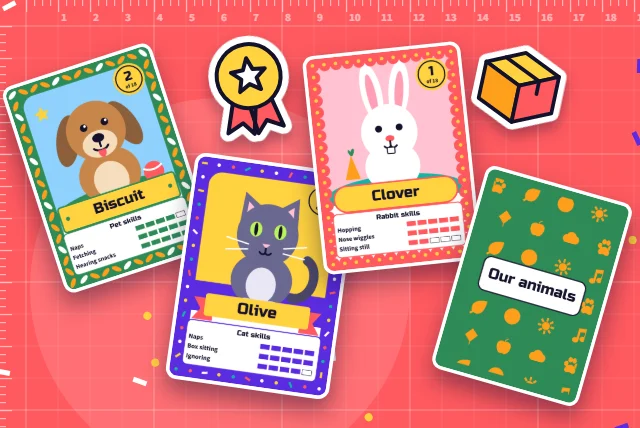
Fourteen finished cards slide off the table and land in a heap on the rug. If they carry no numbers, putting them back means guessing who came first and counting twice to see whether one is hiding under the sofa. With a number on each and a set name, a child can rebuild the pile in a minute.
Numbers and labels are small pieces of housekeeping that make a handful of pictures feel like a collection. The trick is to decide a few things before you print, because ink does not update itself.
Settle the order before the numbers
In Card Workshop, the Collection numbers your cards in order, and you can reorder, duplicate or delete them. A number is only as meaningful as the order behind it, so choose that order on purpose.
| Order | How it reads | Suits |
|---|---|---|
| Alphabetical by first name | Neutral, easy to look up | Classes, clubs, large groups |
| By household or table | Keeps people who belong together side by side | Family gatherings |
| By time | Tells a story from first to last | Trips and seasons |
| By kind | Dogs, then cats, then fish | Pet and nature sets |
| Drawn from a hat | Nobody is “first” on purpose | Sets where rank might matter |
The last row is more useful than it sounds. Number one can look like a favorite. If your cards are about people who might read it that way, use the alphabet or the hat and say so on the back.
Put the number where it can be found
Among the seal pieces there is a Number badge that shows the card’s number in the collection. Add it to a card, pick a corner, and use that same corner on every card. A reader thumbing through a stack looks in one place and finds it.
Lower corners tend to be calm, but any corner works if it does not cover a face. Keep the whole badge inside the cut-safe line, 1/8 in from the edge. A badge sliced by a crooked cut draws the eye for the wrong reason.
Make one card exactly right, then duplicate it for the next person and change the photo and words. The badge keeps its spot, and you save yourself from nudging it into place again each time. You can also note the badge’s position numbers and type them into any card you built separately.
After you add, delete or reorder cards, walk through the set once and check the badges against your plan. Printed cards keep the old numbers, so finish the order before you print.
Name groups you can filter later
Each card in the Collection can have a name and a group, and you can filter by either. Groups are the tool for projects that hold more than one set, such as “Cousins” and “Pets” in the same sitting.
Three habits keep filtering reliable:
- Write the group label the same way every time. “Garden Crew” and “Garden crew 2” invite confusion.
- Use a label that says what the cards share: “Lake Trip,” “Book Club,” “Kitchen Team.”
- Keep private details out. No surnames, no school names, nothing that points to where someone lives.
The Library of Congress, in its advice on keeping personal photos, suggests descriptive file names and tags with the names of people and subjects. Its advice is about digital photos in general, but the same thinking helps here: a label should still make sense to you next year. “Set 1” will not. “Lake Trip, Summer 2026” will.
Label the set on the cards themselves
A group in the Collection lives on your screen. Once cards are cut, only what is printed travels with them. Add a small label with the set name to the same place on every card, or put it on the back with an editable back design. The guide on card names can help if the set itself needs a title.
Some people like “3 of 14.” You can type that with a small text piece, but it will not change by itself, so add it only when the set is closed. If cousins may join later, the badge number alone leaves the door open.
Knowing the count also helps you plan sheets. On letter paper, one sheet holds 9 Classic, 12 Mini, 6 Square or 4 Large cards. A set of 14 Classic cards therefore needs 2 sheets: 9 on the first and 5 on the second. If you want to fill the gaps, that second sheet has room for 4 more. A set of 14 Large cards needs 4 sheets.
Keep a written list beside the files
Make a short list: number, first name, and which picture you used. Add one line saying what the set is and when you made it. The Library of Congress recommends writing a brief description of how your digital files are organized, and keeping at least two copies of what matters in different places.
In Card Workshop, your work is saved automatically in this browser only. Use Download a project copy to keep a file with the cards and pictures, and give that file a plain, descriptive name such as “lake-trip-cards-2026.” Put the list in the same folder.
The list earns its place when someone loses card number 6. You can open the project, find it by name, and print one replacement without hunting. It also tells you at a glance who has not had a card yet, which spares an awkward moment when the set is handed round.
Before the final print, read the numbers aloud from first to last while someone ticks the list. Check the order, the spelling of each name and that every badge sits in its corner. If the set describes real people, give the wording one more look with kind wording in mind, and if rows of levels differ between cards, see how to keep the scale consistent.
Common mistakes
- Printing early and reordering afterwards
- Fix the order and check every badge before the first sheet.
- Putting the badge in a different corner on each card
- Duplicate a finished card so the position stays the same.
- Spelling a group label two different ways
- Filter by group once and correct any card that is missing from the result.
- Using numbers that look like a ranking of people
- Order by the alphabet or by drawing names and say so on the back.
Questions and answers
Does every card need a number?
No. A pair of cards for two grandparents needs none. Numbers help once a set is big enough to lose one.
What happens if I add a card in the middle later?
The order shifts, so check the badges. Cards you printed earlier will still show their old numbers, which is why new members often go at the end.
Can two sets each start at number 1?
Plan on one run of numbers per collection. To start again at 1, download a project copy of the first set and keep it safe before you clear the saved work and begin the second.
Where should the set name go?
The back is a calm place for it. A small label on the front also works if the picture leaves room.
Sources
- Library of Congress, Digital Preservation: Digital photos: personal archiving (checked November 27, 2026)
- Library of Congress, Digital Preservation: Personal digital records (checked November 27, 2026)
Found a mistake? See how corrections work.