Member cards for a club or team that everyone is glad to appear on
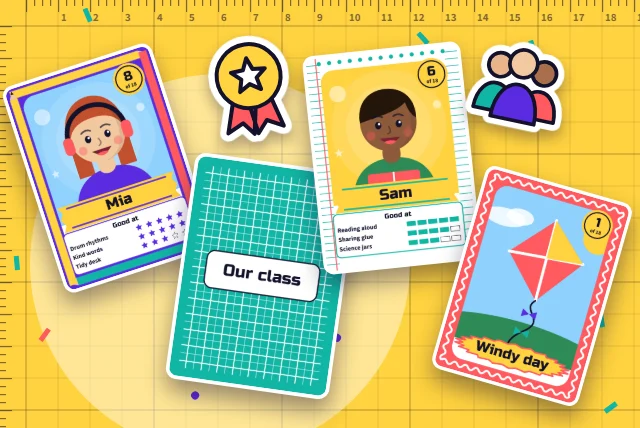
The newest member of the gardening club has been to four meetings and still calls the secretary “excuse me”. Meanwhile, the one person who knows all about pruning sits quietly at the far end of the folding table. A set of member cards pinned beside the kettle could introduce them both without a single speech.
The same idea suits a choir, a walking group, a robotics team or a neighborhood ball team. The craft barely changes: one shared design, room for each person, and nothing that turns the roster into a league table.
Agree on what every card carries
A member set looks like a set when most of it is decided for everyone. Sort the parts into two columns before anyone opens a design tool.
| Part | Same for everyone | Chosen by the member |
|---|---|---|
| Frame | Style and two club colors | Nothing |
| Name banner | Shape and position | First name or nickname |
| Picture | Window shape and size | Photo or drawing |
| Seal | Shape and corner | A role, such as “Keeps the keys” |
| Stat boxes | Three rows | What the rows are called |
| Back | Design and title | One “Ask me about…” line |
Put those choices in a short message and let the group react. Changing a color after one card takes a minute. Changing it after thirty cards takes an evening.
Describe roles, not rankings
Stat boxes let you invent the row names and set each level from 0 to 5, as bars or stars. Among teammates, those levels read like scores, and the person with two stars will notice. You have three good options: leave stat boxes off, set every level the same and let the row names do the talking, or use rows that nobody could compete over.
| Reads like a score | Reads like a person |
|---|---|
| Speed, level 2 | Remembers the route |
| Skill, level 3 | Starts the warm-up songs |
| Strength, level 1 | Always carries the spare gloves |
Ask members to suggest rows for themselves and approve their own card before it is printed. More ideas are in inventing attributes that sound like your people.
Use color, then say it a second way
Clubs often color their sections: one shade for sopranos, another for altos; one for the early walkers, another for the long route. Color is quick to scan, but not everyone sees it the same way. WebAIM explains that red-green deficiencies are the most common kind of color-blindness, so some reds and greens can look much alike, and it advises that color should not be the only way information is carried.
In practice, pair each frame color with words or a shape. Add a small label with the section name, or give each section its own icon, such as a leaf, a book or a music note. In the collection, give every card a group that matches its section, so you can filter and check one section at a time.
Portraits, permission and members who would rather not
Photograph people on the same evening, near the same window, from about the same distance. Faces then come out at a similar size and brightness, and our guide to window light for card photos covers the setup. Ask each person before taking or using a picture, and ask a parent or guardian for younger members.
Someone who prefers not to be pictured still belongs in the set. Tate describes a portrait as a representation of a particular person, and notes that a self-portrait can be symbolic and made in any medium. A pair of worn boots, a favorite trowel or a quick self-drawing can sit in the window while the rest of the card matches everyone else’s.
Print the roster and keep it current
Say your group has 17 members plus one title card for the club. Those 18 Classic cards fill exactly two sheets of letter paper. In Card Workshop, build the model card, duplicate it for each member and add the number badge if you like a visible order.
When someone new arrives, open your project file, duplicate a card, replace the picture and name, and place it at the end of the collection so earlier numbers stay as they were. Then fill one sheet with that card: in Classic size you get nine copies, enough for the member, the notice board and a few spares.
Work is saved only in one browser, so download a project copy after each change and keep it with the club’s notes. Whoever organizes next can open it and carry on. The file holds people’s pictures, so pass it only to someone who needs it. Treat the printed cards as keepsakes and introductions, not as identification.
For youth groups, the privacy limits in class memory cards apply just as well. If you want members to make their own cards at a meeting, set up stations as described for a party card table, and check the finished set against our advice on consistent sets.
Common mistakes
- Scoring members against each other with bars or stars
- Use descriptive rows with equal levels, or remove the stat boxes altogether.
- Letting each person redesign the frame
- Fix the frame and banner for all, and leave personal choice to the picture, role and back line.
- Showing sections by color alone
- Add the section name or a distinct icon to every card as a second signal.
- Putting phone numbers or addresses on the back
- Keep a separate private contact list. Cards get passed around and left on tables.
Questions and answers
What size suits member cards?
Classic 2.5 × 3.5 in holds a name, a picture and three short rows, nine to a sheet. Large 3.5 × 5 in suits a notice board that people read from a step away.
What happens when someone leaves?
Take their card down and ask whether they would like to keep it. If they want their picture gone, delete the card, save a new project copy and remove older copies.
Can a young team make the cards themselves?
Yes, with an adult handling pictures and checking wording. Offer a few fixed choices, such as three icons and one frame style.
Does every card need a photograph?
No. A drawing or a picture of a meaningful object can fill the window, as long as the rest of the layout stays the same.
Sources
- WebAIM, Utah State University: Color-blindness (checked November 27, 2026)
- Tate: Art term: portrait (checked November 27, 2026)
Found a mistake? See how corrections work.